 search console
Does your code improve your search ranking? Know at merge.
Most engineering teams ship and hope. Code Results predicts which deploys will move your rankings the moment they merge — then confirms it once your search data lands.
The full picture,
from merge to rank.
Four data layers. One dashboard. Finally connected.
Developer Velocity
PR throughput, cycle time, and churn — by repo, by sprint, by person. Not a headcount report.
Search Performance
Your Search Console data syncs automatically. Impressions, clicks, CTR, rankings — always fresh.
Code-to-SEO Correlation
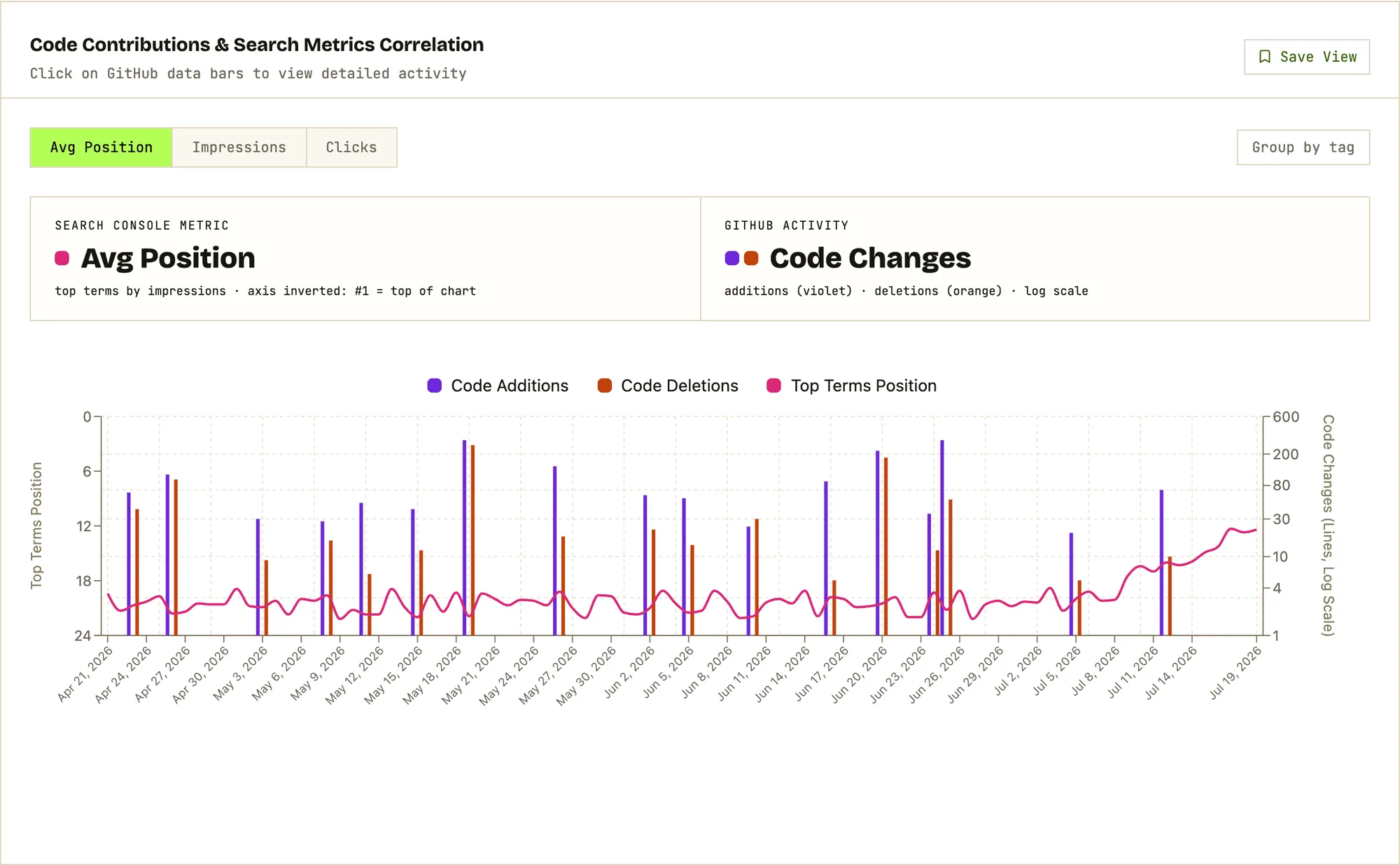
We overlay your deploy history with your search trends. See — not guess — the lag between shipping and ranking.
AI Causal Attribution
Statistical changepoint detection isolates when rankings genuinely shifted. Attribution cards link each shift to the exact PRs that caused it.
Try it on your repo.
Free plan · 3 min setup
Your team ships every week. But do you know what's working?
Search rankings move. Traffic fluctuates. Engineers ship. Connecting those two things has always required a spreadsheet, a guess, and a prayer.
Sample events · your feed builds itself from GitHub + Search Console.
Know the outcome before Google does.
Rankings take 10–21 days to react to a deploy. Your expectations shouldn't. The moment a PR merges, Code Results matches it against thousands of similar changes shipped by other teams and predicts the ranking impact — then the causal engine confirms it once your search data lands.
Sample prediction · from the same engine the dashboard runs on.
Not just correlation.
Actual causation.
Statistical changepoint detection + LLM attribution turns "something changed around here" into "these 3 PRs moved your ranking by 8.3 positions."
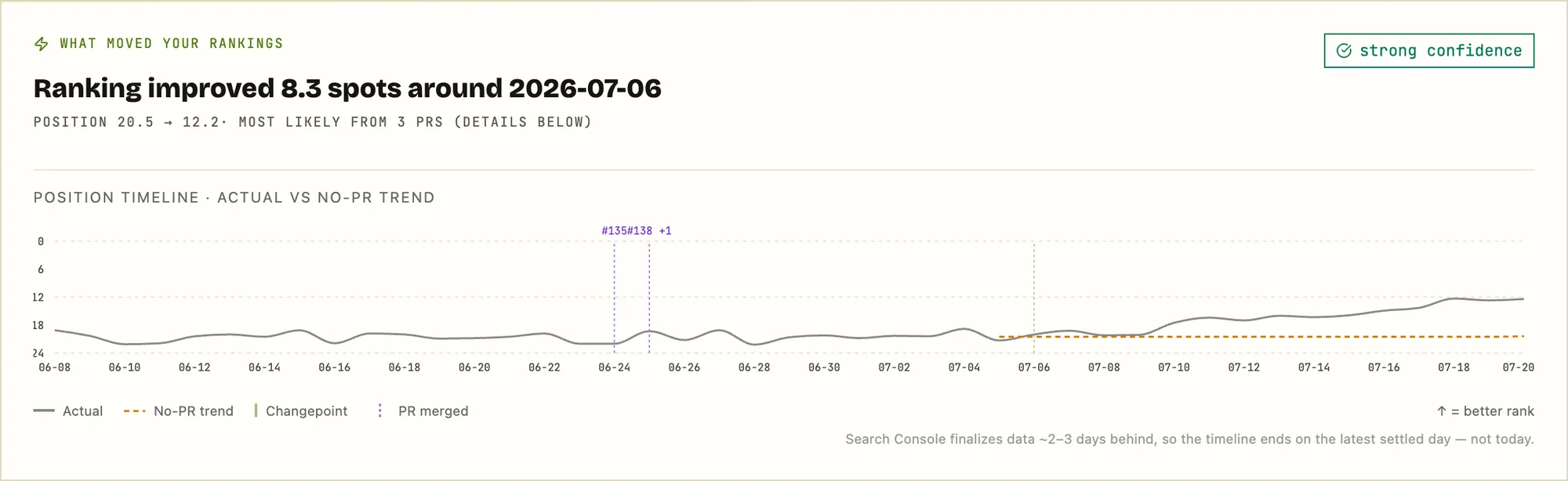
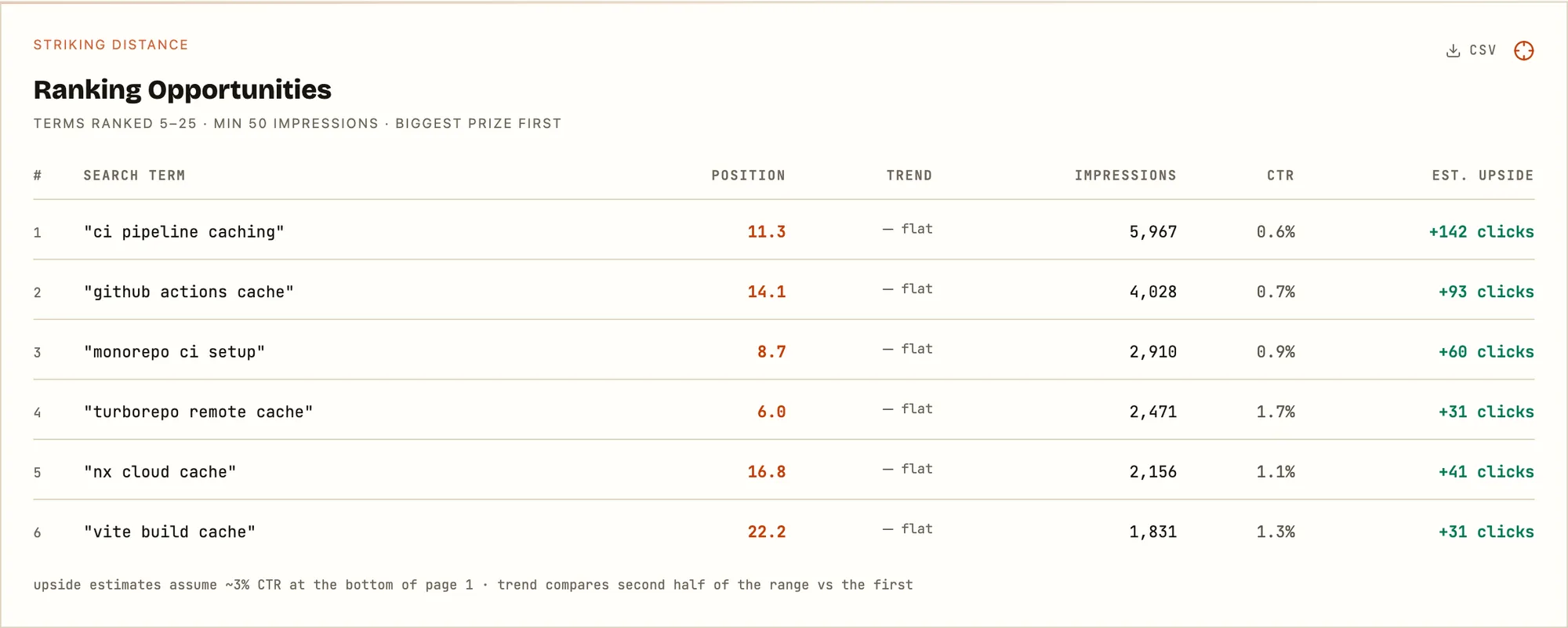
See your dashboard.
A snapshot of what Code Results looks like once you connect a repo and a Search Console site. Real layout, sample data.
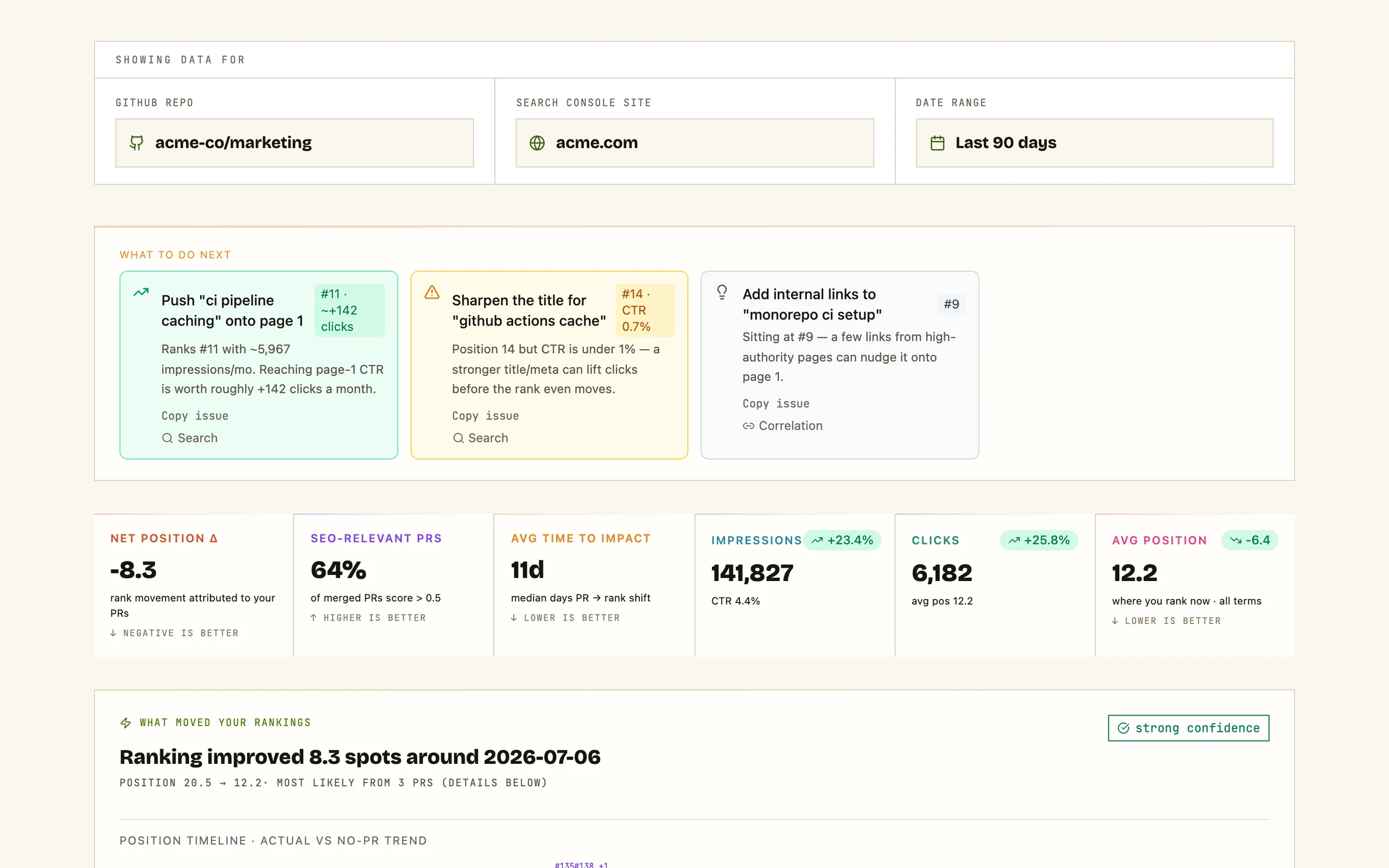
Sample data shown above · the real dashboard renders your live GitHub + GSC.
Bring your AI agent. It gets the full picture.
Code Results ships an MCP server. Claude — or any MCP-capable agent — gets read-only access to your search performance, your PR timeline, and the cross-company benchmarks. Grounded answers instead of generic advice.
- ›Five read-only tools: properties, daily performance, top queries, PR timeline, benchmarks
- ›Three installable skills: weekly SEO report, regression triage, ROI narrative
- ›OAuth consent scoped to your account — revoke anytime in Settings
$ claude mcp add --transport http code-results https://code-results.com/mcpSample exchange · your agent runs against your live data.
One platform. No stitching required.
Built for every seat at the table
CTOs get the org view. Managers get the team view. Everyone gets the answers they've been asking for.
- ›Org-wide velocity at a glance
- ›Engineering ROI by initiative
- ›Headcount vs output trends
- ›Board-ready reporting
- ›Team cycle time and throughput
- ›PR review bottlenecks
- ›Sprint-over-sprint comparison
- ›Contributor health signals
- ›Search impact of recent deploys
- ›Causal attribution per changepoint
- ›AI SEO score for every merged PR
- ›Content experiment results
- ›Feature ship-to-impact timeline
- ›Avg days PR → rank shift
- ›Cross-team velocity comparison
- ›Release cadence tracking
Ready to connect the dots?
Set up takes 3 minutes. No engineering required.
Start free. Go deeper with Pro.
The free plan is the product, not a trial — connect, contribute to the benchmark pool, and see your last 30 days. Pro unlocks everything.
- Last 30 days of search + PR history
- Core dashboard: metrics, correlation chart, changepoint spotlight
- Top search terms + 3 recommended actions
- Benchmarks on the global cohort
- Unlimited repos and sites — your data joins the anonymized benchmark pool
- Full history — everything ever synced, unlocked instantly
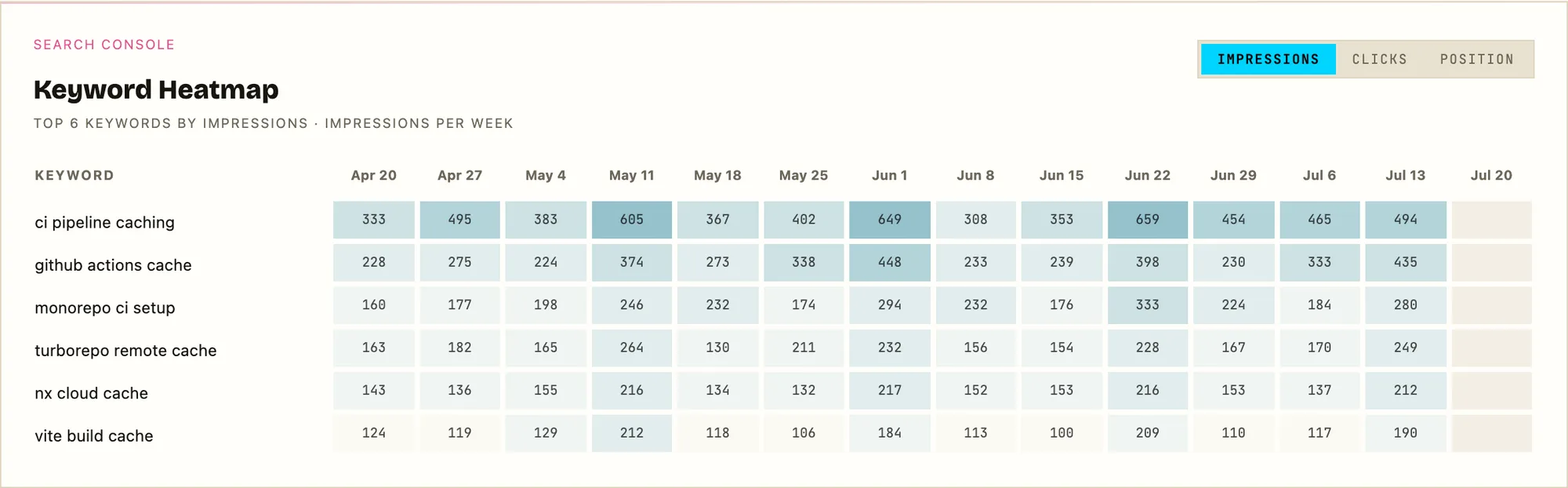
- All modules: striking distance + cannibalization, keyword heatmap, per-term breakouts, DORA, review analytics, live site health, at-merge predictions
- Benchmark filters by industry and service type
- Opt your data out of the benchmark pool
- Unlimited saved views
Up and running in minutes
No complex setup. No engineering required. Just connect and go.
Connect GitHub
Install the Code Results GitHub App and select which repositories to track. We handle everything else — including automatic repo-to-site matching.
Link Search Console
Authorize Google Search Console access with one click. We sync your search data and automatically pair your sites to the right repos.
See the impact
Your unified dashboard is live. Correlations, causal changepoints, and AI attribution emerge automatically as your team keeps shipping.
Questions, answered.
Do you need write access to my code?+
Is my Search Console data safe?+
How long until I see results?+
What if my site doesn't get much search traffic yet?+
How is this different from Ahrefs or Semrush?+
How much does it cost?+
Field notes on code & rankings
How engineering work actually moves organic search — crawl lag, causal attribution, and the deploy-level mistakes that quietly tank rankings.
SEO attribution tools: a methods guide
Your engineering team merged forty pull requests last month. Organic clicks are up 12%. Most teams cannot say which changes did it. A taxonomy of the five methods that connect what you shipped to what Google did — including where each one honestly breaks down.
Read postDiscovered – currently not indexed: what it means and how to fix it
Google knows your URL exists and has chosen not to fetch it. It is not an error, and on a small site it is almost never the "crawl budget" problem the guides tell you to fix — it is crawl demand. What the status actually means, why our own posts sat in it, and the structural fixes that ship in a pull request.
Read postNext.js SEO: the deploy-level changes that move rankings
A client-only SPA fails SEO loudly — the crawler gets an empty shell. Next.js fails it quietly: it renders on the server by default, so a one-line diff can flip a whole route subtree to dynamic, delete a page's metadata, or push its tags out of Google's first crawl — with no error and no failing test. The deploy-level regressions to check by sight.
Read postStop guessing.
Start knowing.
Join engineering leaders who've connected their code to their growth metrics.
Free to start · No credit card required · GitHub + GSC included